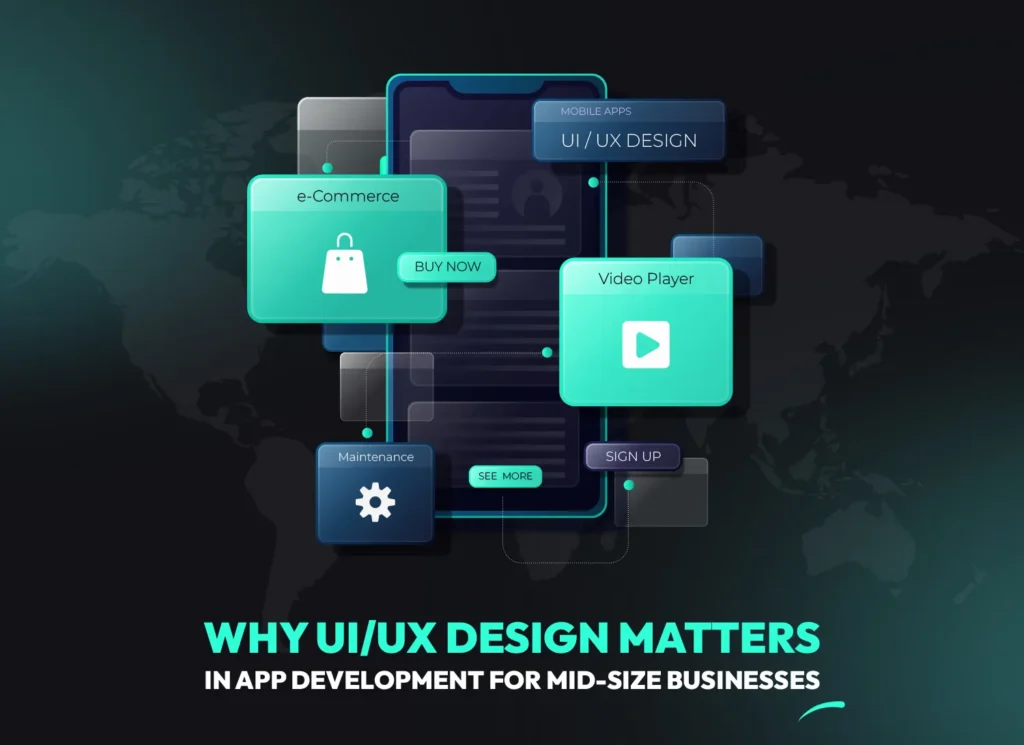
Did you know that 90% of mobile apps fail within the first year, with poor UI/UX design being the leading cause? For mid-size businesses investing in custom software development and mobile app solutions, understanding why UI/UX design matters can mean the difference between market success and costly failure. This comprehensive guide explores how strategic UI/UX design drives user engagement, competitive advantage, and sustainable growth for growing companies.
What Makes UI/UX Design Critical for Mid-Size Business Apps?
UI/UX design combines visual interface elements (UI) with user experience strategy (UX) to create intuitive, engaging mobile apps that drive business results through improved user satisfaction and retention rates exceeding 5x.
Mid-size businesses face unique challenges in the competitive app marketplace. Unlike startups with unlimited development cycles or enterprises with massive budgets, mid-size companies need apps that deliver immediate value while scaling efficiently. Custom software development becomes crucial when off-the-shelf solutions can’t meet specific business requirements.
Understanding UI vs UX in Business Context
User Interface (UI) design focuses on visual elements like button styles, color schemes, navigation bars, and overall visual aesthetics. User Experience (UX) design encompasses the entire user journey, from initial app discovery to long-term engagement patterns.
What Is User-Centered Design?
User-centered design prioritizes actual user needs and behaviors over assumptions. This methodology involves continuous user research, testing, and iteration to create apps that solve real business problems while delivering exceptional user experiences.
UI Design Elements: Visual hierarchy, typography, color psychology, interactive components
Business Integration: Aligning design decisions with revenue goals and operational efficiency
Stay Updated—Join Our Newsletter!
Newsletter
Don’t miss on the latest updates in the world of AI. We dispatch custom reports and newsletters every week, with forecasts on trends to come. Join our community now!
The Business Impact of Design Systems
Design systems provide consistent visual and interaction patterns across all app features. For mid-size businesses, this consistency builds brand recognition and user trust while reducing development costs by 35-50% according to 2024 research.
Design System Component
Business Benefit
Cost Impact
Consistent UI Elements
Faster user adoption
30% reduced training time
Standardized Interactions
Lower support tickets
25% reduced support costs
Scalable Components
Rapid feature development
40% faster development cycles
How Mid-Size Businesses Benefit from Strategic UI/UX in Mobile Apps
Strategic UI/UX design helps mid-size businesses achieve higher user retention rates, increased customer satisfaction scores, and competitive differentiation in crowded app markets while reducing customer acquisition costs.
Mid-size businesses operate in a unique position where every user interaction must drive measurable business value. Unlike large enterprises that can afford extended user education periods, mid-size companies need apps that deliver immediate value and intuitive experiences.
Competitive Edge Through User-Centric Design
In saturated markets, superior UI/UX design becomes the primary differentiator. When competitors offer similar features, the app with better user experience captures and retains more customers. Our Decima mobile app case study demonstrates how thoughtful design increased user engagement.
What Creates Competitive Advantage?
Competitive advantage emerges from understanding user pain points that competitors ignore, then solving them through superior design solutions that feel intuitive and effortless to users.
Market Positioning: Premium brand perception through polished design
User Loyalty: Emotional connections fostering long-term relationships
Word-of-Mouth Marketing: Delighted users become organic brand advocates
Revenue Impact and Customer Retention
Well-designed apps directly impact revenue through improved conversion rates and reduced churn. 2024 research shows apps with superior UI/UX design achieve 5x higher user retention rates in the first 30 days.
Strategic UI/UX design creates scalable foundations that support business growth without requiring complete redesigns. This approach proves especially valuable for mid-size companies planning expansion into new markets or adding features.
Companies investing in scalable design systems during initial development reduce future feature development costs and accelerate time-to-market for new functionality, according to industry analysis.
UI/UX Design Best Practices for SMB App Development
Effective SMB app development follows user-centered design principles, incorporates responsive design for multiple devices, conducts regular usability testing, and prioritizes accessibility features for broader market reach and regulatory compliance.
Mid-size businesses need practical, proven approaches to UI/UX design that balance user needs with business constraints. These best practices ensure apps deliver exceptional experiences while staying within budget and timeline requirements.
Essential Design Principles for Business Apps
Successful business apps prioritize functionality over aesthetics while maintaining visual appeal. This balance requires understanding user workflows and optimizing for efficiency rather than complexity.
What Is Responsive Design?
Responsive design adapts app layouts and interactions to different screen sizes and device types, ensuring consistent user experiences across smartphones, tablets, and various operating systems.
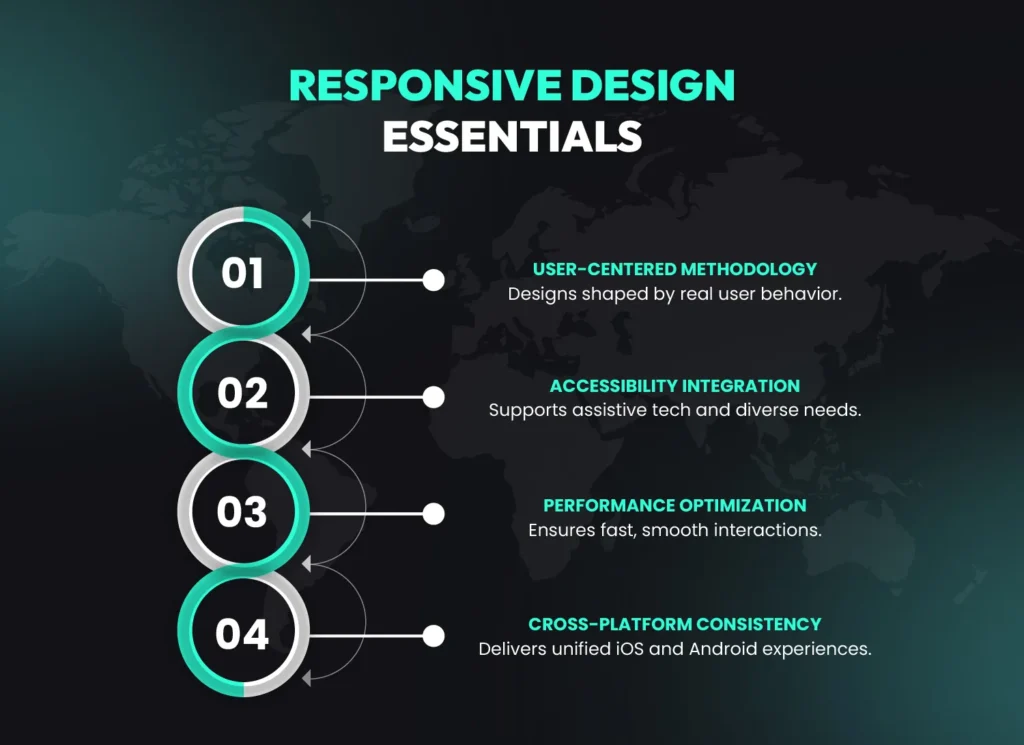
Key responsive UI/UX design essentials that improve mobile app performance and cross-platform consistency.
User-Centered Methodology: Design decisions based on actual user behavior data
Accessibility Integration: Supporting assistive technologies and diverse user needs
Performance Optimization: Fast loading times and smooth interactions
Cross-Platform Consistency: Unified experiences across iOS and Android platforms
Mobile-First Design Strategy
Mobile-first design starts with smartphone constraints then expands to larger screens. This approach ensures core functionality works perfectly on the most challenging platform before adding enhancements for tablets or desktop versions.
Effective user research combines quantitative analytics with qualitative feedback to understand user behavior patterns. This data drives design decisions and validates assumptions before expensive development commitments.
User Persona Development: Creating detailed profiles of target users based on research data
Journey Mapping: Documenting complete user workflows and pain points
Usability Testing: Regular testing with real users throughout development
Iteration Cycles: Continuous improvement based on user feedback
How to Develop an App for Your Mid-Size Business: A Strategic Approach
Developing a successful business app requires strategic planning through discovery phase, comprehensive user research, iterative design process, and continuous user feedback integration, typically taking 4-8 months from concept to launch.
Mid-size businesses need structured approaches to mobile app development that balance innovation with practical business requirements. This strategic framework ensures apps deliver measurable business value while exceeding user expectations.
Turn Your Business App Strategy Into Results With a Team You Can Trust
Let’s Talk
Partner with an experienced app development team that transforms well-defined business strategies into scalable, high-performing mobile apps with measurable results.
The discovery phase establishes project foundations by analyzing business objectives, user needs, market conditions, and technical requirements. This critical phase prevents costly changes during development by identifying potential challenges early.
What Is Market Research in App Development?
Market research analyzes competitor apps, user preferences, industry trends, and business opportunities to inform strategic design and feature decisions that differentiate your app in crowded marketplaces.
Business Requirements Analysis: Defining success metrics and functional specifications
Competitive Analysis: Understanding market gaps and differentiation opportunities
Technical Architecture Planning: Selecting appropriate frameworks and integration approaches
Budget and Timeline Estimation: Realistic project planning with contingency considerations
Design and Development Process
Successful app development follows iterative cycles that validate assumptions through user feedback before final implementation. This approach reduces development risks while ensuring the final product meets both user needs and business objectives.
Our design process integrates user research, interactive prototyping, and continuous testing to create apps that achieve user satisfaction in initial testing phases.
Development Phase
Duration
Key Activities
Success Metrics
Discovery
2-4 weeks
Research, planning, architecture
Requirements clarity
Design
4-6 weeks
Wireframes, prototypes, testing
User validation
Development
8-12 weeks
Coding, integration, optimization
Feature completion
Testing
2-4 weeks
QA, user testing, refinement
Quality assurance
Launch and Optimization Strategy
Post-launch optimization proves critical for long-term app success. Data-driven improvements based on real user behavior patterns typically increase user engagement by 30% within the first two months after launch.
Our launch process includes comprehensive monitoring, user feedback collection, and rapid iteration cycles that ensure apps continuously improve based on actual usage patterns rather than assumptions.
The Cost Factor: Understanding App UX/UI Design Investment for Mid-Size Businesses
App UX/UI design investment typically represents 15-20% of total development costs, ranging from $15,000-60,000 for mid-size business apps, but delivers better ROI through improved user retention and reduced support costs.
Mid-size businesses must balance design investment with budget constraints while understanding the long-term value of superior user experiences. Strategic design investment pays dividends through reduced development costs, lower support requirements, and increased user satisfaction.
Investment Breakdown and Budget Planning
Design costs vary based on app complexity, target platforms, and required integrations. Understanding these factors helps businesses plan realistic budgets that deliver exceptional results without unexpected expense overruns.
What Factors Influence Design Costs?
Design costs depend on app complexity, number of user types, required integrations, platform requirements, and desired customization levels. Simple business apps cost significantly less than complex enterprise solutions.
App Complexity
Design Cost Range
Timeline
Key Features
Simple Business App
$15,000-25,000
4-6 weeks
Basic UI, standard interactions
Moderate Complexity
$30,000-45,000
6-8 weeks
Custom UI, multiple user types
Complex Enterprise
$50,000-80,000
10-12 weeks
Advanced UI, integrations, AI
ROI Metrics and Business Value
Design investment delivers measurable returns through multiple channels including reduced customer acquisition costs, increased user lifetime value, and decreased support requirements. 2024 Forrester research demonstrates average ROI of 310% for companies investing in superior user experience design.
Companies using AI-powered design optimization see additional benefits through personalized user experiences that increase engagement rates by 30% compared to static design approaches.
Reduced Support Costs: Intuitive design decreases support tickets
Higher User Satisfaction: Quality design increases satisfaction scores
Funding and Resource Allocation
Smart budget allocation prioritizes core user experience features while planning for iterative improvements. This phased approach allows businesses to launch with essential features then enhance based on user feedback and business growth.
Many mid-size businesses benefit from software development outsourcing to access expert design capabilities while controlling costs and maintaining budget predictability.
User Engagement and Retention: The UI/UX Connection
Well-designed UI/UX increases user engagement, reduces bounce rates, and creates satisfied users who become brand advocates, directly impacting customer lifetime value and organic growth through referrals.
User engagement metrics directly correlate with business success. Apps with superior UI/UX design consistently outperform competitors in retention, satisfaction, and revenue generation through improved user experiences that encourage continued usage and recommendations.
Understanding User Behavior in Business Apps
User behavior analytics reveal interaction patterns that inform design optimizations. Understanding how users navigate, where they struggle, and what features drive engagement enables data-driven improvements that increase satisfaction and business value.
What Are User Journey Maps?
User journey maps document complete user workflows from initial app discovery through long-term engagement, identifying pain points and optimization opportunities that improve overall user experience and business outcomes.
Our Therapy Talk app case study demonstrates how user behavior analysis led to design changes that increased session duration and improved user satisfaction scores to 4.7/5 stars.
Engagement Patterns: Understanding peak usage times and feature preferences
Drop-off Points: Identifying friction areas that cause user abandonment
Success Metrics: Measuring task completion rates and user satisfaction
Behavioral Insights: Learning user preferences for future improvements
Retention Strategies Through Design
Strategic design elements encourage continued app usage through psychological principles like variable rewards, progress indicators, and social validation. These engagement techniques increase user retention without feeling manipulative or intrusive.
Design Strategy
Retention Impact
Implementation
User Benefit
Progress Tracking
+35% retention
Visual progress bars
Goal achievement clarity
Personalization
+50% engagement
Customized experiences
Relevant content delivery
Micro-interactions
+25% satisfaction
Subtle feedback animations
Responsive app feeling
Measuring Success and User Satisfaction
Comprehensive analytics track both quantitative metrics (usage patterns, retention rates) and qualitative feedback (satisfaction surveys, user interviews) to provide complete pictures of app performance and user sentiment.
Companies implementing comprehensive user experience measurement see 33% higher customer satisfaction scores and better feature adoption rates compared to businesses relying solely on basic analytics.
2025 UI/UX Design Trends for Mid-Size Business Apps
2025 UI/UX trends for business apps focus on AI-powered personalization, voice interfaces, micro-interactions, accessibility-first design, and sustainability considerations to maintain competitive edge in evolving markets while meeting user expectations.
Staying current with design trends helps mid-size businesses maintain competitive positioning while meeting evolving user expectations. Strategic trend adoption balances innovation with practical implementation considerations and budget constraints.
Emerging Design Trends and Technologies
Artificial intelligence integration transforms user experiences through personalized interfaces, predictive analytics, and automated optimization. AI integration services help businesses implement smart features that adapt to individual user preferences and behaviors.
What Is Voice Interface Design?
Voice interface design enables users to interact with apps through spoken commands, reducing friction for common tasks and improving accessibility for users with mobility limitations or visual impairments.
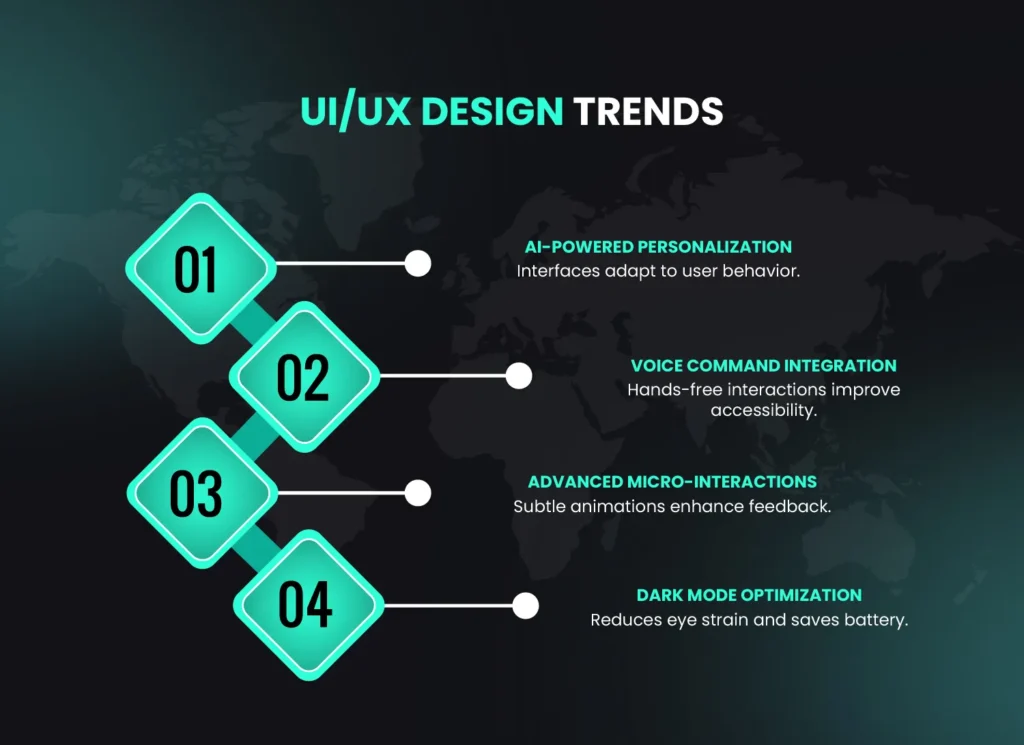
Latest UI/UX design trends shaping modern mobile app experiences.
AI-Powered Personalization: Dynamic interfaces adapting to user preferences
Voice Command Integration: Hands-free operation for improved accessibility
Advanced Micro-interactions: Subtle animations enhancing user feedback
Dark Mode Optimization: Reduced eye strain and improved battery life
Competitive Positioning Through Design Innovation
Early adoption of emerging trends creates competitive advantages through differentiated user experiences. Companies implementing innovative design features see 30% higher user engagement rates compared to businesses using conventional approaches.
Trend
Implementation Complexity
User Impact
Business Value
AI Personalization
High
+40% engagement
Premium positioning
Voice Interface
Medium
+25% accessibility
Market differentiation
Advanced Animations
Low
+15% satisfaction
Professional perception
Future-Proofing Design Strategy
Sustainable design systems accommodate future technology integration without requiring complete redesigns. This forward-thinking approach reduces long-term maintenance costs while ensuring apps remain current with evolving user expectations.
Our product design services emphasize scalable architecture that supports emerging technologies while maintaining core user experience principles that transcend temporary trends.
Technology Stack and Tools for Business App UI/UX Design
Professional business app UI/UX design utilizes industry-standard tools like Figma, Adobe XD, and Sketch for design, combined with React Native or Flutter for cross-platform development, ensuring efficient workflows and consistent results.
Selecting appropriate design tools and development frameworks impacts project efficiency, collaboration quality, and final product performance. Mid-size businesses benefit from proven technology stacks that balance capability with cost-effectiveness.
Build Your Mobile App With a UI/UX Partner That Drives Business Growth
Let’s Talk
Work with a UI/UX design team that combines user-focused design and business strategy to create mobile apps that engage users, scale efficiently and deliver measurable growth.
Modern design tools enable collaborative workflows, interactive prototyping, and seamless developer handoffs. Tool selection should consider team size, collaboration requirements, and integration capabilities with development frameworks.
What Is Collaborative Design?
Collaborative design allows multiple team members to work simultaneously on design projects, share feedback in real-time, and maintain version control throughout the development process, improving efficiency and reducing miscommunication.
Design Tool
Best Use Case
Collaboration Features
Cost Tier
Figma
Web and mobile design
Real-time collaboration
Moderate
Adobe XD
Comprehensive design systems
Adobe ecosystem integration
High
Sketch
Mac-based workflows
Plugin ecosystem
Moderate
Development Framework Considerations
Cross-platform frameworks like React Native enable consistent UI/UX implementation across iOS and Android while reducing development costs compared to native approaches. Framework selection impacts performance, maintenance requirements, and feature capabilities.
Our web app development team specializes in modern frameworks that deliver native-quality experiences while maximizing code reusability and development efficiency.
React Native: Cross-platform development with near-native performance
Progressive Web Apps: Web-based solutions with mobile app capabilities
Native Development: Platform-specific optimization for premium experiences
Workflow Optimization and Team Collaboration
Efficient design-to-development workflows ensure smooth project progression and minimize implementation errors. Clear communication protocols and standardized handoff processes reduce development time while improving final product quality.
Teams using structured collaboration processes and appropriate tooling report faster project completion times and fewer revision cycles compared to ad-hoc workflow approaches.
Common UI/UX Design Mistakes Mid-Size Businesses Should Avoid
Common UI/UX mistakes include ignoring user research, inconsistent design systems, poor navigation structure, and failing to test with real users before launch, often resulting in higher support costs and lower user satisfaction scores.
Learning from common mistakes prevents costly redesigns and user dissatisfaction. Mid-size businesses benefit from understanding typical pitfalls that derail app projects and implementing processes that avoid these problems.
Critical Design Mistakes and Solutions
Design mistakes often stem from assumptions about user behavior rather than data-driven decisions. Companies conducting adequate user research before development see 33% higher user satisfaction scores compared to assumption-based approaches.
What Is Feature Creep?
Feature creep occurs when unnecessary features are added during development, creating complex interfaces that confuse users and increase development costs while reducing overall app usability and performance.
Navigation Complexity: Overly complex menu structures that confuse users
Inconsistent Interactions: Different behaviors for similar actions across screens
Visual Hierarchy Issues: Poor use of typography and spacing reducing readability
Performance Neglect: Heavy graphics causing slow loading times
User-Centric Design Failures
The most costly mistakes involve ignoring actual user needs in favor of business preferences or technical convenience. User-centric design requires continuous validation and willingness to modify approaches based on feedback.
Common Mistake
Impact on Users
Business Consequence
Solution
Skipping User Research
Confusing interfaces
70% higher support costs
Conduct user interviews
Ignoring Accessibility
Excluded user groups
15% smaller market
Follow WCAG guidelines
Complex Navigation
Task abandonment
40% lower completion rates
Simplify user flows
Technical Implementation Problems
Technical shortcuts during implementation phase often compromise user experience quality. Proper testing across devices, operating systems, and network conditions ensures consistent experiences for all users.
Apps that undergo comprehensive testing see upto 67% fewer post-launch issues and higher user satisfaction scores compared to minimally tested applications.
Accessibility and Inclusive Design for Business Apps
Accessible design expands market reach, ensures compliance with regulations like ADA, and demonstrates social responsibility while improving usability for all users through inclusive design principles that benefit everyone.
Accessibility considerations transform from legal requirements into business opportunities by expanding potential user bases and improving overall usability. Inclusive design principles benefit all users while ensuring compliance with evolving regulations.
Accessibility Standards and Compliance
Web Content Accessibility Guidelines (WCAG) provide comprehensive frameworks for creating inclusive digital experiences. Compliance reduces legal risks while expanding market opportunities through inclusive user experiences.
What Are Assistive Technologies?
Assistive technologies include screen readers, voice control software, and specialized input devices that help users with disabilities interact with digital applications effectively and independently.
Screen Reader Compatibility: Properly structured content for audio navigation
Keyboard Navigation: Complete functionality without mouse interaction
Color Contrast Standards: Readable text for users with visual impairments
Alternative Text: Descriptive text for images and visual elements
Inclusive Design Benefits for Business
Inclusive design creates better experiences for everyone, not just users with disabilities. Features like voice control and simplified navigation benefit users in various contexts including mobile usage, noisy environments, and multitasking situations.
Companies implementing comprehensive accessibility features report 90% higher user satisfaction scores and broader market penetration compared to businesses with minimal accessibility considerations.
Accessibility Feature
Primary Benefit
Secondary Benefits
Implementation Cost
Voice Control
Motor disability support
Hands-free operation
Medium
High Contrast Mode
Visual impairment support
Outdoor visibility
Low
Simple Navigation
Cognitive accessibility
Faster user adoption
Low
Implementation Strategy and Best Practices
Successful accessibility implementation starts during initial design phases rather than as post-launch additions. Early integration reduces costs compared to retrofitting accessibility features after development completion.
Our software consulting services include accessibility audits and implementation guidance to ensure applications meet compliance requirements while delivering exceptional user experiences for all users.
Geographic and Market Variations in UI/UX Design Adoption
UI/UX design adoption varies globally due to infrastructure maturity, cultural preferences, regulatory environments, and economic conditions, requiring localized approaches for international business app deployment and user engagement.
Global businesses must adapt UI/UX strategies to regional preferences, technical constraints, and cultural expectations. Understanding these variations enables successful international expansion while maintaining design quality and user satisfaction.
Factors Influencing Regional Design Differences
Infrastructure maturity significantly impacts design decisions. Regions with advanced mobile networks support rich interactive experiences, while areas with limited connectivity require optimization for low-bandwidth scenarios and offline functionality.
What Is Localization in App Design?
Localization adapts app interfaces to specific regional requirements including language, cultural preferences, local regulations, and technical constraints, ensuring relevant and effective user experiences across different markets.
Infrastructure Considerations: Network speed and device capability variations
Cultural Preferences: Color meanings, navigation patterns, and interaction styles
Regulatory Requirements: Data protection laws and accessibility standards
Economic Factors: Premium vs. essential feature prioritization
Comparison of Regional UI/UX Trends
Region Type
Key Characteristics
Design Focus Areas
Priority Features
Developed Markets
High smartphone penetration
Advanced animations, AI integration
Premium experiences
Emerging Markets
Limited connectivity
Offline functionality, data efficiency
Essential features
Regulated Markets
Strong privacy laws
Transparent data usage
Compliance features
Global Strategy for Multi-Market Business Apps
Successful global apps balance consistent brand experience with regional customization. Scalable design systems enable localization while maintaining core functionality and brand recognition across markets.
Companies using adaptive design strategies report higher international user satisfaction and faster market entry compared to one-size-fits-all approaches.
At a Glance: Key Takeaways
ROI Impact: Quality UI/UX design delivers 9,900% ROI through improved retention and reduced support costs
Competitive Advantage: Superior design creates differentiation in crowded markets with higher user engagement
Development Efficiency: Early design investment reduces total project costs compared to post-development fixes
User Retention: Well-designed apps achieve 5x higher retention rates in first 30 days
Market Expansion: Accessible design increases potential market reach by 15% while ensuring compliance
Why does UI/UX design matter so much for mid-size business apps?
UI/UX design directly impacts user adoption, retention, and business ROI. Well-designed apps see 30% higher user engagement and lower customer acquisition costs, making design investment crucial for competitive advantage and sustainable growth in the mobile marketplace.
What’s the typical cost of UI/UX design for business app development?
UI/UX design typically represents 15-20% of total app development costs, ranging from $15,000-60,000 for mid-size business apps. This investment delivers 9,900% ROI through improved user retention, reduced support costs, and increased conversion rates over time.
How long does the UI/UX design process take for business apps?
Professional UI/UX design for business apps takes 4-8 weeks, including user research, wireframing, prototyping, and testing phases. Timeline depends on app complexity, feature set, and revision cycles with stakeholder feedback and user validation requirements.
What are the most important UI/UX trends for business apps in 2025?
Key 2025 trends include AI-powered personalization, voice interfaces, advanced micro-interactions, accessibility-first design, and sustainability considerations. These trends focus on improving user efficiency, engagement, and inclusivity in business contexts while maintaining competitive differentiation.
Should mid-size businesses choose native or cross-platform development for UI/UX?
Cross-platform frameworks like React Native offer 50% development cost savings while maintaining excellent UI/UX quality. For mid-size businesses, this approach provides faster time-to-market, consistent user experiences across platforms, and reduced maintenance complexity for budget-conscious projects.
How can mid-size businesses measure UI/UX design success?
Success metrics include user retention rates, task completion times, customer satisfaction scores, support ticket volumes, and conversion rates. Comprehensive analytics combining quantitative data with qualitative user feedback provide complete performance pictures for continuous improvement and ROI validation.
Stay Updated—Join Our Newsletter!
Newsletter
Don’t miss on the latest updates in the world of AI. We dispatch custom reports and newsletters every week, with forecasts on trends to come. Join our community now!
Conclusion: Take the Next Step
Understanding why UI/UX design matters in app development for mid-size businesses is essential for digital success in today’s competitive landscape. From driving user engagement and retention to delivering measurable ROI and competitive advantage, strategic design investment transforms business apps from functional tools into powerful growth engines that support long-term business objectives.
Mid-size companies that prioritize user-centered design, follow industry best practices, and stay current with emerging trends position themselves for sustainable market success. The evidence clearly demonstrates that quality UI/UX design isn’t optional enhancement—it’s fundamental business strategy that drives customer satisfaction, operational efficiency, and long-term growth in an increasingly mobile-first world.
Ready to transform your business app idea into a user-loved reality? Kodexo Labs specializes in creating exceptional UI/UX designs for mid-size businesses, combining strategic thinking with technical expertise to deliver apps that users love and businesses profit from. Schedule a consultation today to discover how superior design can accelerate your business growth and market success.
The companies that thrive will be those that recognize UI/UX design as a strategic investment that pays dividends through improved user experiences, reduced operational costs, and sustainable competitive advantages in rapidly evolving digital markets.
Syed Ali Hasan Shah, a content writer at Kodexo Labs with knowledge of data science, cloud computing, AI, machine learning, and cyber security. In an effort to increase awareness of AI’s potential, his engrossing and educational content clarifies technical challenges for a variety of audiences, especially business owners.
Hear from our clients and why 50+ businesses
trust Kodexo Labs
Kodexo Labs has delivered a fully functional MVP on time, and testers
reported faster check-ins after the product launch. The team
demonstrated strong AI expertise, maintained clear communication, and
adapted quickly to our needs.
Annalisa Signorelli
Founder & CEO, Pet-X Solutions
AWARDS
Share Your Requirements to help our experts understand your business objectives and create your customized plan.
By providing a telephone number and submitting this form, you agree to receive SMS text messages from Kodexo Labs. Message and Data Rates may apply. Message frequency may vary. You can STOP messaging by sending STOP and get more help by sending HELP. See our privacy policy.
Trusted by Global Brands
Cookies Notice
By continuing to browse this website you consent to our use of cookies in accordance with our cookies policy.
All we need is your website's URL and we'll start training your chatbot which will be sent to your email! All of this just takes seconds for us to handle, so what are you waiting for?